Thailand Buddhist Calendar
- 4.7
- Rating
- 1.00M
- Installs
- Free
- Price

 Analysis by App-foxy
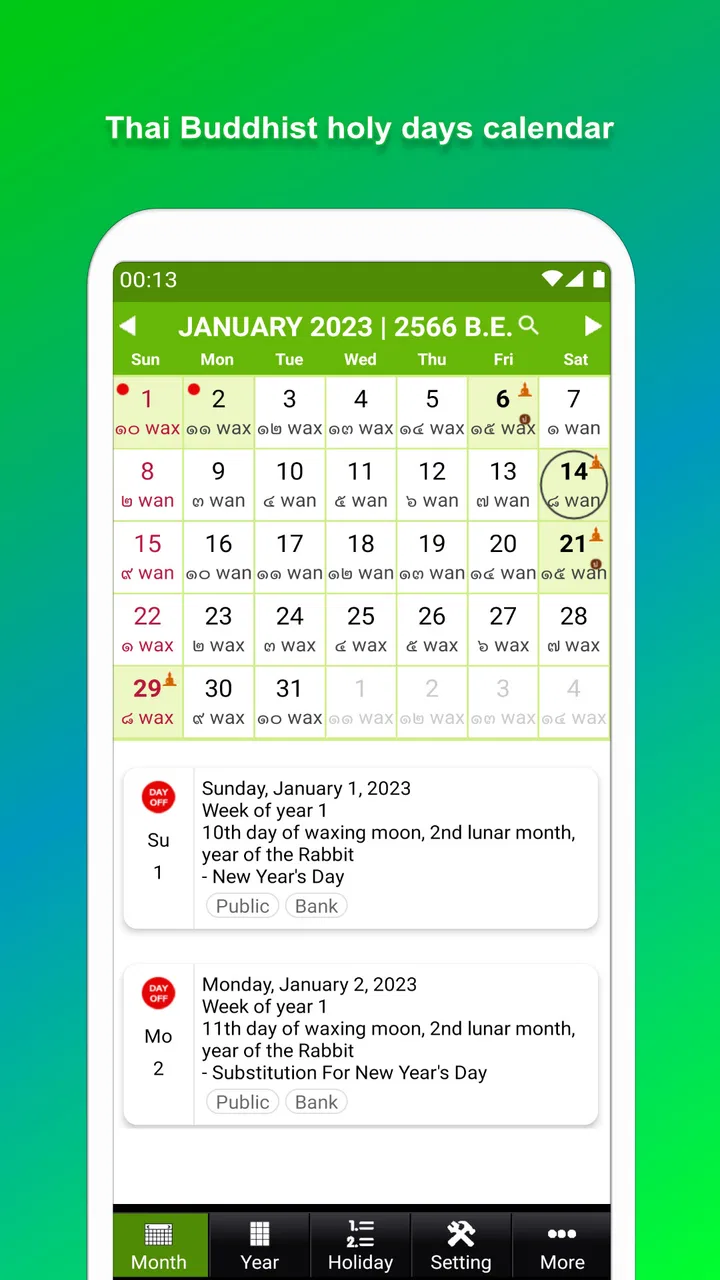
I use a calendar app differently from a social app or a task manager: I want it to answer a practical question quickly, then stay out of my way. Thailand Buddhist Calendar is built for that purpose. It is an events app from TungYaaApp that combines a Thai calendar view with Buddhist holy days, reminders, a widget, and a short-note function. In my experience, its appeal is not visual excitement but convenience for people who need Thai dates and religious observances close at hand.
The app is free, suitable for Everyone, and has reached over one million installs. Its average rating is 4.7, which suggests that the focused idea works well for many users. I would recommend it most readily to someone who regularly checks Buddhist holy days, wants a Thai calendar on the phone, or needs a lightweight way to attach a quick note to a date. I would be more cautious about recommending it to someone seeking a complete work planner, shared family calendar, or deeply integrated scheduling system.
What it feels like to use on an ordinary day
The most useful way to approach this app is as a reference tool rather than a replacement for every calendar you already own. I can imagine opening it in the morning to check the date, looking ahead for an important Buddhist observance, and adding a short reminder before returning to whatever I was doing. That limited workflow is also its strength: the app has a clear cultural and practical focus instead of trying to become an all-purpose productivity platform.
You May Also Like

 Blood Strike: 2.5 Anniversary
Blood Strike’s Loadouts Turn Every Drop Into a Tactical Gamble
A close look at Blood Strike’s custom loadouts: how fast access to signature weapons reshapes its battle royale rhythm, rewards preparation, and narrows the gap between fights.

 Pandora - Music & Podcasts
Pandora’s Music Is Easy to Start, but Harder to Recover
Pandora’s strength is its low-effort path from a seed to a station. Its weak spot is how much confidence it asks you to place in connection, setup, and quiet recovery.

 8 Ball Pool
 Is Built on Rivalries, Rematches, and Routine
A close look at the rivalries, rematches, shared routines, and unanswered safety questions that turn a quick pool match into a persistent mobile community.

 Samsung Music
’s Quiet Strength Is Playing What You Already Own
Its reach comes less from spectacle than from dependable access to a personal library. That simplicity is both the app’s strongest retention engine and its ceiling.

 AccuWeather: Weather Radar
AccuWeather Review: A Quick, Clear Forecast for Everyday Decisions
For everyday plans, the best forecast is the one you can understand quickly. AccuWeather makes rain timing, radar, and local conditions easy to act on, with a few trade-offs.

 Hill Climb Racing
Why Hill Climb Racing Still Turns Crashes Into One More Run
A tiny car, a bumpy hill and one more upgrade: Hill Climb Racing keeps resurfacing because its simple chaos makes every near-miss feel personal.
More From Our News Desk



For example, if I were planning a temple visit around a busy week, I would first use the calendar to identify the relevant holy day, then place a reminder around the preparation I needed to make. A short note could hold a simple detail such as an item to bring or a person to contact. The advantage is that the date, reminder, and note stay connected in one place. The trade-off is that this is better for personal reference than for coordinating a group with several people and multiple calendars.
The widget is particularly useful for quick checking. A widget can turn the calendar into something I see without opening the app, which matters when the goal is simply confirming today’s date or noticing an upcoming observance. I would still treat the widget as a glanceable aid rather than a full planning surface. For detailed scheduling, I would expect to open the app or use a more comprehensive calendar alongside it.
Fast access matters more than visual complexity
Thailand Buddhist Calendar does not need a complicated interface to justify its place on a phone. Its value depends on how quickly I can get to the relevant date and understand what it means. A focused calendar generally has a lower mental cost than searching through a general calendar filled with work meetings, birthdays, subscriptions, and unrelated reminders.
That focus also shapes my expectations about speed. A calendar with a narrow purpose should feel quick to open and easy to scan, especially when I am checking one date rather than managing a long list of appointments. I would not choose this app because I expect advanced automation or a large project-management workspace. I choose it because the path from opening the app to checking a Thai or Buddhist date is meant to be straightforward.
One practical tip is to decide what belongs in the short-note area before using it heavily. I would keep notes brief and date-specific: a preparation reminder, a personal intention, or a small checklist. If I started storing long journal entries, detailed plans, and unrelated tasks there, the feature would become less useful as a calendar companion. The app works best when the note supports the date instead of competing with it.
Where heavier use can expose limits
The app should suit occasional checking and regular personal use, but heavier use changes the comparison. Someone who enters appointments throughout the day, moves events between time zones, shares schedules with relatives, or depends on recurring work routines may eventually find a general calendar more capable. Thailand Buddhist Calendar can remain useful for Buddhist observances while another calendar handles the broader workload.
This is an important distinction because a specialized calendar can be excellent at one kind of awareness without being the best tool for every event. I would not judge it harshly for lacking the breadth of a full productivity suite; I would simply avoid asking it to solve a different problem. For my own setup, the sensible arrangement would be to use this app for Thai calendar and holy-day awareness, while keeping major appointments in the calendar already used by my household or workplace.
There is also a useful trade-off between a widget and opening the full app. The widget reduces friction for quick checks, but it cannot replace the context of the complete calendar view. When I need to compare several dates or add a note carefully, opening the app is the safer workflow. When I only need a reminder of what day it is, the widget is the more efficient choice.
In-app purchases are listed at $4.49 per item. That makes it worth checking which parts of the experience are included before deciding whether the free version covers my routine. I would begin with the basic calendar, holy-day view, reminders, widget, and short-note workflow, then decide whether any optional purchase adds enough value for my habits. A person who only checks dates occasionally may have little reason to spend more.
Reliability is about trust, not just opening speed
For a calendar, reliability means more than launching without delay. I want the date information to remain understandable, reminders to be useful rather than confusing, and notes to be easy to find when I return later. The app’s long presence, released in September 2015, gives it the feel of an established tool rather than a brand-new experiment. Its current version is 4.1, so I would still keep it updated through the normal app-store process.
I would build a small habit around any important reminder: after creating it, I would check the date and time once more and make sure the wording is clear. This is not a criticism unique to this app; it is simply good calendar practice. A reminder is only helpful if I can understand it at a glance weeks later. Short, specific notes are less likely to become ambiguous than vague entries such as “prepare” or “remember.”
Another non-obvious strength is separation of attention. A general calendar may bury religious observances among dozens of personal and professional events. Here, the Thai Buddhist focus can make those dates easier to notice. That is valuable for users whose planning follows the Buddhist calendar or who want religious days to remain visible without mixing them into every appointment list.
At the same time, I would not use a single phone calendar as the only record for something with serious consequences. If a holy day affects travel, a business opening, a family gathering, or a formal commitment, I would verify the arrangement through the relevant local or personal source as well. The app is a convenient planning aid, but important decisions deserve the same care I would give any digital calendar.
Device compatibility and everyday resource expectations
The minimum operating-system requirement is Android 6.0, which gives the app a reasonably broad audience among Android users with older devices. That is helpful if I am using a budget phone or keeping an older handset for family use. It also means the app is not aimed only at people with the newest hardware.
From a practical standpoint, a calendar centered on dates, reminders, a widget, and short notes should be easier to live with than a media-heavy application. I would expect the main experience to be modest in resource demands, but I would not treat that as a promise that every device will behave identically. Older phones can still slow down when storage is crowded, too many background processes are active, or the system is under general strain.
The widget deserves special attention on older devices. Widgets are convenient because they keep information visible, but they also become part of the home-screen experience. If I noticed unusual battery use, delayed updates, or a crowded home screen, I would remove the widget temporarily and open the app when needed. That gives me a simple way to separate the calendar’s core usefulness from the extra convenience of constant visibility.
For someone choosing between Android and iOS, the confirmed compatibility detail here is the Android requirement, so I would look for the appropriate version in the platform’s own store before planning around it. The important point is not to assume that an app’s name guarantees identical availability or behavior across operating systems. I would also check that the phone can display Thai calendar information comfortably, especially if the device uses a language or font setup different from my usual preference.
Who will get the most from it
I think this app is a strong match for Thai users, people observing Buddhist holy days, families who want a visible cultural calendar, and anyone who prefers a dedicated reference app over a crowded general planner. It can also help someone living abroad who wants Thai dates and observances available alongside everyday life in another country.
It is less suitable for a user who needs collaborative planning, a detailed agenda for work, complex project tracking, or a single place for every kind of appointment. In those cases, a mainstream calendar with stronger scheduling and sharing tools would be the better primary option. I could still keep Thailand Buddhist Calendar installed as a specialist companion, but I would not make it carry responsibilities it was not designed to handle.
The developer, TungYaaApp, has kept the concept recognizable: Thai calendar information, Buddhist holy days, reminders, a widget, and short notes. That combination is more useful than a bare date grid because it connects awareness with small actions. I can check a date, mark what I need to remember, and return later without building a complicated system around it.
My performance and usefulness verdict
After looking at the way the app is positioned and the workflow it supports, my verdict is positive but specific. Thailand Buddhist Calendar is not the calendar I would choose for a busy office schedule or a shared household command center. It is the one I would choose when Thai dates and Buddhist observances are the reason I am opening a calendar in the first place.
Its perceived speed should come from its focused purpose, while the widget can make routine checks even quicker. Its heavier-use limits appear when I try to turn short notes and reminders into a complete productivity system. Its compatibility with Android 6.0 makes it approachable for older devices, and the free starting point lowers the barrier to testing the workflow for myself.
The best way to use it is as a dedicated cultural calendar beside, not necessarily instead of, your main planner. That arrangement gives me the specialized visibility I want without sacrificing the sharing, scheduling, and organization features that broader calendar services usually handle better. I would install it if Buddhist holy days are part of my routine, set up the widget only if quick visibility genuinely helps, and keep notes short enough to remain useful.
With a 4.7 average from around 49 thousand ratings, the app has clearly found an audience, and I can understand why. It is free, its age rating is Everyone, and its purpose is easy to grasp. The current version is 4.1, while optional in-app purchases cost $4.49 per item. For me, those details reinforce a simple conclusion: try the core experience first, use it for a real week of date checks and reminders, and keep it only if its Thai Buddhist focus makes planning clearer than the general calendar already on your phone.
In short, I would recommend it to a friend who wants a practical Thai calendar with religious-day awareness and lightweight personal reminders. I would steer that friend elsewhere only if they need collaboration, advanced scheduling, or a universal planner. Used within its proper role, Thailand Buddhist Calendar is a focused and sensible companion rather than an overloaded all-in-one tool.
FAQs for Thailand Buddhist Calendar
01What features does the Thailand Buddhist Calendar app offer?
The Thailand Buddhist Calendar app provides users with a comprehensive view of both the Gregorian and Buddhist calendars. It includes features like reminders for important Buddhist holidays, daily quotes, moon phases, and customizable widgets. Users can also find information about Buddhist practices and significant historical events in Thailand.
02Is the Thailand Buddhist Calendar app available for both Android and iOS?
Yes, the Thailand Buddhist Calendar app is available for download on both Android and iOS platforms. Users can find the app on the Google Play Store for Android devices and the Apple App Store for iOS devices, ensuring accessibility for a wide range of users.
03Does the Thailand Buddhist Calendar require an internet connection to function?
The Thailand Buddhist Calendar app primarily functions offline, allowing users to access calendar details and reminders without an internet connection. However, certain features like updates, additional content, or special event notifications may require an internet connection to ensure the app remains current.
04Are there any in-app purchases or ads in the Thailand Buddhist Calendar app?
The app may include a basic free version supported by ads, with an option for users to purchase an ad-free experience. Additionally, there might be premium features offered through in-app purchases, such as exclusive content, enhanced customization options, or advanced notifications.
05How user-friendly is the Thailand Buddhist Calendar app for beginners?
The Thailand Buddhist Calendar app is designed with user-friendliness in mind, featuring an intuitive interface that makes navigation easy for beginners. It includes helpful guides and tooltips to assist new users in understanding the app's features, ensuring a smooth and enjoyable experience for all users.
Pros
- Comprehensive lunar and solar calendar.
- Includes Thai public holidays.
- User-friendly interface.
- Customizable notifications.
- Detailed Buddhist event descriptions.
Cons
- Limited language options.
- Occasional notification glitches.
- Ads can be intrusive.
- No offline mode.
- Requires frequent updates.

Thailand Buddhist Calendar
Gallery